Tuesday, July 31, 2007

New UMPC powered by Vista

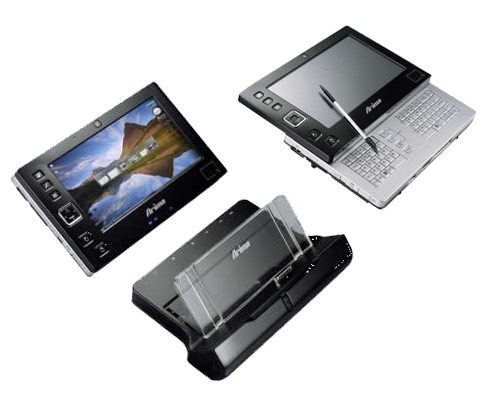
At CES 2007 show Medion has unveiled its new ultra mobile PC MD RIM 1000. This is one of the first models with Origami Experience interface introduced by Microsoft. I’d note that UMPC of the last year featured similar form and dimensions and now everything is getting different. For example, the UMPC by Medion is equipped with a 6.5” display. It is peculiar for variety of input methods – the stylus or the finger with the touchscreen or the keyboard. The release is set for the end of January. Most likely we’ll see the device under different brands, as it is released on the OEM-basis.


The specs of Medion UMPC:

* Operating system - Microsoft Windows Vista
* Display - 6.5” 800x480 pixels
* CPU - VIA C7-M 770
* Chipset - VX700
* 512/768 MB DDR2 RAM
* HDD 30 GB
* VGA-camera
* Wi-Fi (802.11b/g), Bluetooth 2.0
* Slot for SD/SDIO/MMC cards
* VGA-out, USB 2.0 x 2, connector for the headphones and the microphone
* Optionally - GPS, TV-tuner, TPM
* Dimensions – 190x120.8x28.3 mm
* Weight - 720 g
* Battery life on a single charge - 4 - 5 hours

New photo frame by Parrot


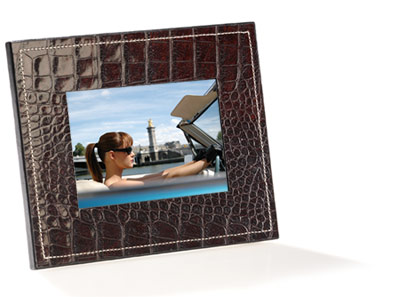
Parrot has unveiled its new digital photo frame PHOTO VIEWER 7” in addition to a 3.5” frame introduced a year ago. The new model features a big 7” display with higher resolution. There is much memory onboard, now it can store up to 500 images instead of 100.

The photo frame supports Bluetooth 2.0 + EDR interface. The frame can automatically adjust brightness. There is the support of both landscape and portrait display modes. The frame is decorated with natural materials – leather or wood. The European release is set for February. The recommended price makes up €199 in Europe and $249 in the US (in the second quarter).

The specs of Parrot PHOTO VIEWER 7”:

* 7” TFT display 720x480 pixels, 262K colors
* Formats - JPEG, from 700-kpix to 7-mpix
* CPU - Samsung 2412, 128 MB SDRAM plus 128 MB of internal memory to store photos
* Interface - Bluetooth 2.0 + EDR
* Dimensions – 222x176x22 mm
* Weight - 490 g

KDDI W51T – a 3-megaixel camera and a rotating display

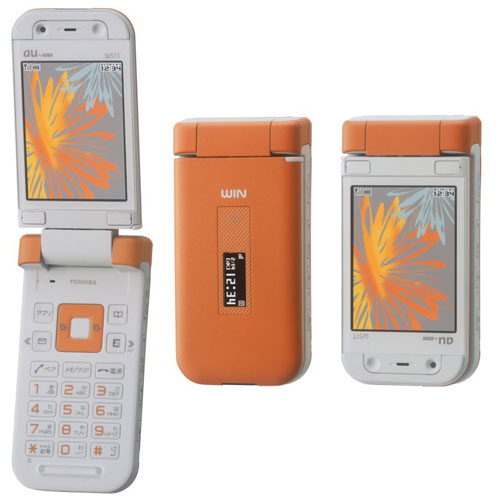
Here comes another product by the Japanese operator produced by Toshiba. KDDI W51T is a stylish clamshell with the rotating display, which enables you to snap and view photos more comfortably. Besides there is a 3-megapixel camera.

Its internal display has a 2.6” diagonal, QVGA resolution, 262K colors. The external OLED display is a monochrome one, 96x39 pixels, 0.8” diagonal. It is designed to display service info, for example, on the network signal level and incoming SMS. There is an expansion slot for microSD cards.

Measuring 51x103x21 mm it weighs 142 g. Battery life in CDMA 1X networks makes up about 290 hours standby and 220 minutes in the talk mode. The model is available in 3 color solutions.

Monday, July 23, 2007

Sony Vaio UX380N

We reviewed the first Sony Vaio UX series machine almost a year ago, the UX180P. Much has remained unchanged since that model and the UX280P that followed it just a few months later. The UX380N is the Windows Vista version of the UX, with a slightly faster Intel Core Solo CPU (1.3 vs. 1.2 GHz) and a gig of RAM (same as the UX280P).

This handheld computer is larger than the OQO model 2 but still small enough to fit in a quite large pocket, average sized purse or briefcase. More powerful than UMPCs, with a faster CPU and higher resolution display, the UX380N is nonetheless smaller. Though not a speed demon by normal notebook standards, the UX is the most powerful handheld computer on the market as of this writing (the OQO model 2 has a 1.5GHz CPU, but it's a VIA C7M which is significantly slower than the UX processor).

The UX380N measures just 6 x 3.74 x 1.27 - 1.5 inches and weighs 1.2 pounds and has a built-in thumb keyboard (slide up the display panel to reveal it). Unfortunately, the keyboard still has very little travel and tactile feedback, and you'll need long fingers to reach the middle keys easily. Like the older US models, the UX380N still has an AT&T (Cingular) EDGE wireless module with a popsicle antenna that swivels up from the back. We'd hoped by now that the UX would have moved up to a 3G HSDPA AT&T module, or shifted to Sprint's EVDO network, as we've seen on some Vaio TX models. Though AT&T's EDGE network is excellent in terms of coverage area and strength, its 2.5G speeds feel very "last year".

In terms of features, the UX could easily pass for a well-equiped ultra-light notebook. It has WiFi 802.11a/b/g, Bluetooth 2.0 +EDR, integrated Intel 950 graphics, a gig of RAM and a 40 gig hard drive. The $500 more expensive UX390N has a 32 gig solid state hard drive and the keyboard face plate is dark blue-black, but it's otherwise identical to the UX380N. The UX380N sells for approximately $1,799 to $1,899. Both the UX380N and the UX390N ship with Windows Vista Business edition.

In the Box

As with all UX series models, Sony includes a nice selection of accessories; a good thing given the price and the usual cost of Sony add-ons. The UX380N comes with a Lithium Ion battery, one small telescoping metal stylus, two replacement mouse navigator covers, wrist strap, padded nylon carry case with belt clip, a short dongle adapter which has Ethernet, VGA and A/V-out ports, a docking station (with power port, A/V out, three USB 2.0 ports, an unpowered FireWire 400 port, VGA and wired 10/100 Ethernet port) and a small plastic desk stand that slides onto the back of the UX and acts as a desk holder for those times you don't want to hold it and don't have the docking station with you. As with all Vaio notebooks, restore CDs/DVDs are not included, you must burn them yourself using Sony's included utility and an external CD or DVD burner or buy them from Sony for $20, or rely on the hidden restore partition whenever you need to re-install apps or restore the entire drive. Since the UX has no optical drive, that restore partition is a handy thing. We used a Sony 510UL dual layer DVD burner over FireWire with no problems to make backups and install software.


UX380N included accessories
Display and Stylus

The display is simply gorgeous; Sony's XBrite with pen support is a lovely thing. The digitizer is accurate, and you'll want to use the stylus for small on-screen elements (because a finger seems huge compared to that tiny close box) and to place your cursor when entering text. Text is indeed quite small but surprisingly readable. That doesn't mean you won't get eye strain, because you will: at 1024 x 600 resolution on a 4.5" display text is clear but tiny. That's the tradeoff between the Vaio and the OQO or FlipStart which have lower resolution displays with larger fonts but you'll find yourself scrolling side to side frequently and some dialogs or even the Windows Start Menu contents won't fit on screen.

The UX also supports 800 x 600 resolution but that doesn't help much with readability since it letterboxes the sides by default to compensate for the 4:3 resolution 800 x 600 setting on the wide screen LCD. Should you have trouble with tired eyes, your best bet is to increase the font dpi in Windows, though that might increase the need for scrolling. The touch screen is extremely accurate and a pleasure to use. Window Vista Business has Tablet features built-in so you can enable handwriting recognition which works very well on the UX. Windows Journal is included with Vista, and that tablet-friendly application is a great way to take handwritten notes that you can turn into text later.

Design and Ergonomics

(Note: the design is identical to the UX180P, and so this section uses some of the same descriptive information from our 180P review). Even after 9 months on the market, the device is still pure eye candy. It's sleek, innovative and incredibly small. It turns heads. The curvy-back with ergonomic grips make it feel really good in hand though it's thick— the thinnest part at the middle measures 1.27" and the hand-grips areas are 1.5".

Sony Vaio UX180P


The left grip incorporates the battery pack. That's the EDGE antenna, raised. The back and left side have plenty of air vents, and doesn't get uncomfortably hot in hand. It does have a quiet cooling fan which you'll hear from time to time.


The controls are intuitive and easy to use. Par for the course with Sony, you don't get printed guide that tells you what everything is, but you do get a PDF manual. Use this device for 5 minutes and you've figured out what all the buttons do, and you're enjoying how they lay in just the right places to reach easily and how they improve on the device's overall usability.
Sony UX180P

What do those controls do? On the left you'll see a larger button up top with a smaller button directly below. These are the left and right click buttons, as on a mouse or trackpad. The textured square control on the top right is your mouse control, similar to the IBM eraser stick (two spare textured covers come with the unit). It's pleasant to use, accurate and responsive. Since the device has a touch screen which responds to the stylus and your finger, the mouse button is a secondary control.

Just below the mouse button you'll find zoom buttons which enlarge the on-screen image but don't actually change resolution on the fly (it's a quick-use visual aide only). The power slider is on the side, and it has a hold position so it doesn't accidentally power up in your briefcase or purse. Conversely, you can lock it on so you don't accidentally power it off when watching a movie or listening to MP3s. That said, it's pretty hard to accidentally move the power slider when using the UX. A useful scroll button lives below the right/left click buttons. Hold it down while using the mouse to scroll a page rather than move the cursor. And below that you'll find Sony's launcher button which launches (and dismisses) their Application launcher (more on that later). If you press and hold the launcher button, you'll activate Sony's touch command which allows you to do things using on-screen gestures with the stylus. Alternatively you can turn off gesture commands and use the Windows standard right click feature in its place, You may customize the buttons as you see fit, should you prefer them to do other things.

The power jack, docking port, 3.5mm stereo out and mic in jacks are on the bottom, and the Memory Stick Pro Duo slot is on the top. The UX380P's single USB 2.0 port is on the left side (3more ports are on the docking station), and the camera button (launches the camera app and takes shots) is on the top right side. Given its placement and the device's handheld nature, it feels like a traditional shutter button. Both front and back cameras work in Skype which is handy if you want to show your video-conferencing buddy something that you're looking at.


The Sony UX380P's thumb keyboard is certainly much better than nothing, but we won't claim it's an ergonomic delight. The backlit keyboard has almost no travel and very little tactile feedback. Despite this, I found it fairly easy to type correctly but you don't have the feeling you're getting it right with no feedback. Since the UX is wider than a BlackBerry or Sidekick those with short thumbs or smaller hands may struggle to reach the middle keys. The blue backlighting turns on when you hit a key and remains on for a few seconds after the last key press. It's bright and easy to see in the dark, though the backlight is fainter toward the edges.


Bottom edge.

Despite its small size, the keyboard has a dedicated number row, Control, Alt and Windows Start Menu keys as well as up/down left and right keys (with embedded page up/page down, home and end functions when you press the Fn key). Everything is in its normal place— no swapped period and comma keys, no strangely located tab key. Good. The only thing missing is a right shift key, which is annoying. Soon you'll discover that Sticky Keys (part of the Windows accessibility features) is your best friend. With Sticky Keys on, you don't need to simultaneously hold down the shift (or Alt or Control) keys and a letter key. Press the shift key, then press the letter you desire (very handy for initial caps in a sentence). The Sony has a caps lock key.


Horsepower and Performance

We found the UX180P to be very usable with Windows XP, and the UX280P even more so thanks to the memory bump from 512 megs to 1 gig. The UX3xx series got a modest CPU speed increase from the 1.2GHz Core Duo the the 1.33GHz Intel Core Solo U1500. The SSD (solid state drive) in the UX390N offers a small speed boost in some operations and the Windows Experience score for the SSD hard drive is 5.2 vs. 3.7 on the convention hard disk in the UX380. But Vista Business feels a bit slow on the UX3xx series, albeit faster than the OQO model 2. Our fresh UX380N took 1.5 minutes to boot into Vista (to the point where Windows Sidebar loaded and the machine was actually ready for real use), with the UX390N being faster to boot (though it's slower to resume from hibernation than the UX380N). Waking from sleep takes about 20 seconds on the UX380N, not an instant-on PDA but bearable given the computer's full-blown Vista power. Once Vista completely loads, MS Office 2007 runs fine, as do IE, Firefox and other Net and productivity applications. They aren't blazing fast, but they're certainly usable. Photoshop is a bit sluggish, Dreamweaver runs with reasonable speed and some less demanding games run passably though not admirably. Keep in mind this is a palmtop computer and not a 17" desktop replacement though.


The included docking station, front and back.

The UX use Intel's 945 chipset (the same chipset used on standard Intel-architecture notebooks), has a gig of DDR2 RAM soldered to its tiny motherboard (the machine can handle 2 gigs max but Sony doesn't offer a UX with this option), and either the 32 gig solid state flash memory drive (on the UX390N) or a 1.8" 40 gig ATA100 conventional hard disk (UX380N). Graphics are handled by Intel's integrated 950GM which uses 224 megs of shared (system) memory (Windows reports 251 megs). Though the UX only manages a 2.0 score for 3D graphics, it gets 3.1 for Aero graphics and so Aero does run just fine. If you plug in an external monitor at 1024 x 768 Aero will continue to run, but up the resolution to 1600 x 1200 or higher and it turns off.

Gaming on the UX isn't the challenge we expected. Newer games that aren't hugely demanding in the 3D department actually did better because they support the computer's native resolution which means the stylus works. We tested the Sims 2 and it ran fine, though not blazingly fast and most visual effects were turned down; Quake 2 and Age of Empires II (though you must use 800 x 600 resolution and forego the stylus).

The UX380N managed a Windows Experience Score of:

Processor: 2.9
Memory: 4.3
Graphics (for Aero): 3.1
3D Graphics: 2.0
Hard Disk: 3.7

We downloaded the latest Intel driver from Intel's web site and the 3D graphics score jumped up to 2.6! Oddly doing the same for our Vaio TX with the same Intel graphics chipset decreased speed, but in the UX's case it's definitely worthwhile.

PC Mark 05 results were as follows:

pcmarks: 1361
CPU: 1712
memory: 1740
graphics: 421
HDD: 2074

We ran the PC Mark tests with an external monitor connected, since the graphics test require 1024 x 768 resolution. While these numbers aren't up to today's fast dual core machines, they're surprisingly good for a handtop and comparable to 2 to 3 pound ultralight notebooks (other than the integrated graphics, which are a bit lower than average).

The 40 gig disk drive has about 15 gigs free as shipped with Windows Vista and bundled full and trial versions of software. That's enough to store required apps, but not enough room for those with extensive iTunes video libraries to go wild. You can store movies and data on Memory Stick Duo cards, and we used a 4 gig SanDisk Ultra II Memory Stick Pro Duo with our UX. This card is fast enough for ReadyBoost, though we didn't get a worthwhile performance gain using it (and resuming from hibernation was slower).

Software

We used to love software bundles, but these days you get a lot of bloatware. The tiny UX even gets its share of added software and trialware you'll probably want to remove to conserve precious disk space (we gained 5 gigs by removing Norton, MS Works, a variety of software trials and SQL Server 2005 which is used by the Vaio Media Server-- which most won't use on a palmtop computer). That said, if you don't own MS Office and don't intend on buying it, the full version of MS Works 8.5 might come in handy. There's also a 60 day trial of Microsoft Office 2007 Small Business Edition, WinDVD (DVD playback software), Microsoft Streets and Trips 2006, Sony's Sonic Stage and Image Converter, a basic edition of QuickBooks, Cingular Connection Manager and more.

Networking

The well connected UX has WiFi, Bluetooth 2.0 +EDR, the AT&T wide area wireless connection and wired 10/100 Ethernet (which requires either the dongle adapter or the dock). It has an integrated Sony Ericsson GSM radio which supports GPRS and EDGE (WAN), The unit has the Intel Pro/Wireless Intel PRO/Wireless 3945ABG chipset for WiFi 802.11a/b/g, which is a part of Intel's mobile package. It's reliable, comes with good management software and good security support. We found the UX380N had better WiFi range than the UX180P, though the hardware is the same (the software seems to provide more power to the radio when in low signal areas). . Bluetooth behaves well (if such a thing can ever be said) and the Sony uses Toshiba's Bluetooth stack. You can use it with Bluetooth stereo headphones, GPS, mobile phones and PDAs among other things.

The built-in EDGE radio supports both EDGE and the slower GPRS standard. It's strictly for data and there's no software for making voice calls. There's a SIM card slot under a tiny hump on the left side, affixed with a single tiny phillips head screw (the door must be closed securely or the Vaio will complain that the SIM door is open). So yes, you could pop your phone's SIM in there, but by the time you take out your phone's battery, remove the SIM, unscrew the door on the Vaio and pop the SIM in there you could've already checked your email with your BlackBerry or Treo. Life is easier if you can leave the SIM in there, should you plan on frequent EDGE network use. Or use your 3G Bluetooth phone as a wireless modem for better speeds (assuming the phone has Bluetooth 2.0, older versions can be a bottleneck-- the Samsung BlackJack would be a good choice). The UX is sold locked to Cingular, but we're told you can still call Sony support to get an unlock code should you wish to use another carrier's SIM card in the Vaio. Cingular's connection manager software is pre-installed and is easy to use (though it's an older version than that currently available on Cingular's web site). The UX has very good reception on Cingular's network and we got around 140k. Do raise the antenna, it gets you two bars more reception. The UX380N comes with a 30 day Cingular trial.

size comparison


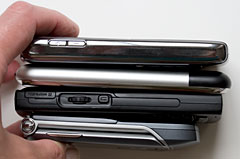
Size comparison: the 17" HP Pavilion dv9000 is on the bottom, then the 11" Sony Vaio TX850 with the UX380N and Moto RAZR on top.


Battery Life

The UX ships with a 2600 mAh battery that slides onto the back comprising the right grip. An extended battery approximately doubles runtimes and makes for a humpy grip that's actually easier to grip than the standard battery. The UX will not lie flat on its back with the extended battery, though it will still fit in the docking station. The standard battery lasted us 2.5 to 3 hours on a charge using the Vaio Optimized power setting with WiFi and Bluetooth on. Lowering the display brightness has a surprisingly small impact on battery life, unlike most notebooks.

The UX comes with a very compact charger, that's about the same size as the PSP's and doesn't add much weight or bulk to a travel bag.

Security

Given the full power of Vista and the UX380N's incredibly small size, it could be far too easy to leave sensitive data behind in a cab or at a cafe. Thankfully the UX series has biometric fingerprint reader and Protector Suite QL for Windows. You can use this to log into Windows, enter application login and passwords and web logins: instead of typing in your password, swipe your finger and you're in. The software reads fingerprints quickly and well and you can enroll several fingers (they need not be from the same person). Security is managed at the hardware level by a TouchChip Fingerprint Coprocessor.

Conclusion

We loved the original Sony Vaio UX180P for its daring step into the world of full-featured handheld computing. The UX380N is still compelling and amazing, but the so-so keyboard, slow EDGE connection and sluggish Vista performance hold it back from another Editor's Choice award. That said, if you need Vista in your (roomy) pocket, nothing beats the UX.

Pro: Beautiful design with excellent build quality and very good ergonomics. The UX has everything you'd expect from a normal notebook, including a standard Intel chipset, WiFi, Bluetooth 2.0 +EDR, a Memory Stick Pro Duo slot, and a USB 2.0 port-- quite amazing and powerful. We like that the dock and travel dongle are included, along with a padded soft case. The front and rear facing cameras are perfect for Skype and vertical market use.

Con: Keyboard lacks travel and good tactile feedback. EDGE connection is dated now that many notebooks come with embedded EVDO or HSDPA. Vista runs fine, but the machine can just barely keep up.

Price: $1,899 for UX380N, $2,399 for UX390N

iPhone

That most hyped piece of personal electronics is finally here: the iPhone. Announced in January 2007 at Mac World San Francisco by an incredibly enthusiastic Steve Jobs (yes, he's always enthusiastic-- so much so that he could sell lipstick to chickens, but this time he was over the top). The iPhone released June 29 at 6pm across America. It's hard to be unfamiliar with this smartphone (a name Apple avoids using because the iPhone is supposed to be more cool, better at multimedia and more friendly than other smartphones). It's been on TV, radio, in newspapers, and on this and every other tech web site for months. So we assume you know this is a unique touch screen phone with few buttons and a built-in iPod music and video player. Not your average iPod Video, but a wide screen, higher resolution variety with an even more luscious screen. Capacity-wise, we're in iPod nano territory: the iPhone comes in 4 and 8 gig varieties. The customized version of Mac OS X takes up 700 megs of that capacity and the iPhone uses flash memory rather than a tiny hard disc. That's good for battery life and durability, but not capacity as flash memory is pricier than miniaturized hard disc platters.


iPone
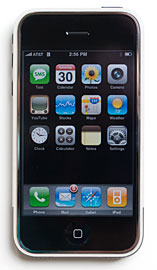
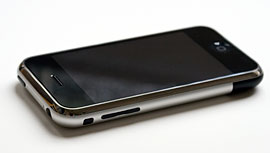
The iPhone has a full-fledged iPod built-in that plays both music and video (all the same formats supported by the iPod Video 5G and 5.5G, except video coverted with iSquint doesn't play). It's gorgeous looking, as you'd expect from Apple, and unlike the iPod Video, we didn't feel the iPhone's display was too small to watch lots of video. The 3.5" glass display dominates the front face (yes it shows fingerprints but they're easily wiped off), the silver back which matches the MacBook Pro has an Apple logo and the antennas are located at the bottom rear area under a black plastic cap (plastic doesn't block radio signals). The phone is very thin, and measures 4.5 x 2.4 x 0.46 inches. It's similar in size to the BlackBerry 8800, but a tad narrower and a few hundredths of an ounce heavier. The only physical controls are the sleep/wake button (also powers the phone on and off), a ring silencer switch, volume buttons, a Home button that takes you to the main display view shown above. The only ports are the SIM card slot, standard 30 pin iPod connector and a 3.5mm stereo headset jack. The tiny camera lens is on the back.

iPhone size comparison
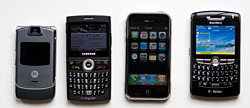
The Moto RAZR V3m, Samsung BlackJack, iPhone and the BlackBerry 8800.


size comparison with iPhone

Top to bottom : BlackBerry 8800, iPhone, BlackJack and Moto RAZR V3m.

It sells for $499 for the 4 gig model and $599 for an 8 gig model. There are no discounts or subsidies. Yes, this is an expensive product, but Apple and AT&T remind us that it's a phone, an iPod and a PDA in one. Is it worth it? We think so. If you're an existing customer, you'll need to extend your contract 2 years to buy this phone. The nice part is you'll still be eligible for a discounted (subsidized) phone at your original contract's end date, since you won't be getting that discount on the iPhone. Contracts are not additive, so your new contract will begin the day you purchase an iPhone and end 2 years from that date. Both new and existing customers must activate the phone using a Mac or PC running iTunes 7.3 (or newer) and Apple released 7.3 on the day of the iPhone's release. You'll need to have an Internet connection to activate the phone, and you'll need to sign up for an Apple iTunes account, even if you don't plan on purchasing music or videos from Apple's online store. Voice plans remain unchanged from AT&T's current plans and both single line and family plans are available. You must sign up for the iPhone unlimited data plan which is $20/month and includes 200 SMS (packages with more SMS are available at a higher price).

Apple has had more control over the iPhone's release and marketing than any other phone manufacturer. This is both good and bad: you choose your plan at home without any pressure from sales staff. However, once you open the box, you'll have to pay a hefty 10% re-stocking fee to return it, which is Apple's standard policy for their computer and consumer electronics products. If the phone is defective, you can't bring it to your neighborhood AT&T store to swap it (but you have better luck at an Apple store). You must ship it to Apple for repair, and Apple says repairs will take 3 business days. This is also Apple's standard consumer electronics policy, and it doesn't work well with phones, as they may quickly learn. Customers are used being able to return a phone to the carrier within 14 days without a financial penalty if it didn't suit them. And one can live without their iPod for 3 business days, but few of us can live without our cell phones. You'll have to have a backup phone if your iPhone needs repair. Not good. Note that any Apple branded accessories, such as Apple's Bluetooth headset are also subject to the same return policy. The Bluetooth headset isn't yet available, but should be within a few weeks.


Phone and Reception

AT&T has a 5 year exclusive on the iPhone in the US. While their coverage is generally very strong and broad, only you know if their service is available and adequate in your area. The iPhone is a quad band GSM world phone supporting the 850/900/1800/1900MHz bands, and it will work anywhere in the world GSM service is available. The phone is sold locked to AT&T however, which means you can't pop another GSM carrier's SIM in the phone. The SIM card is located at the top edge of the phone, and you must stick a paper clip in the tiny hole to eject the SIM card tray. You can use the SIM in other AT&T phones and both voice and data will work (it will use MEdiaNet and the WAP.CINGULAR APN). But you'll have to use normal voice mail rather than the iPhone's visual voice mail while that SIM is in another phone.

There is no voice dialing, period. Will that come later? Our crystal ball declines to answer. But there is something unique to the iPhone: Visual Voicemail. Tap on the voicemail button and you'll see an email style list of new voicemail messages, complete with the caller's name if they're in your address book. This means you can quickly select among voicemails to listen to important messages first.

Our iPhone's voice quality was good and volume was average. We've seen some reports in other reviews of problems with these, but we absolutely had no problems with either. Voice isn't as crystal clear as on 3G AT&T phones like the BlackJack and 8525 which use a higher quality voice codec (thanks to the greater bandwidth on 3G) but we heard no discernable difference in voice quality or volume when switching between our BlackBerry Curve, 8800 and iPhone. Likewise, call quality and volume are fine through the included stereo headset which plays voice in two channels of mono. Should a call come in while you're listening to music through the headset, the music fades and you can pinch the inline mic to pause to take the call (on-screen answer or reject with caller ID info appear on screen as well). Reception has been excellent on our unit.


iPhone SIM card slot


The SIM card tray is located on the phone's upper edge. Push a paper clip into the tiny hole (it takes some force) to eject the tray and SIM card.


Web, email and Networking


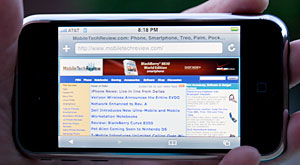
Unfortunately, the iPhone doesn't have 3G, which is a shame given the fantastic Safari web browser that provides a true desktop view of web pages. Instead, the iPhone has EDGE (also referred to as 2.5G) which averages 90 - 150k. The bright spot is WiFi: the iPhone has 802.11b/g for much faster web browsing and email downloads. Of course you need to be in range of a home, work or public hotspot to use WiFi, unlike EDGE which is available anywhere you can get a GSM signal. The iPhone prompts you to connect to WiFi networks it finds when you launch the web browser. You can turn this off if it bugs you, and you can turn WiFi off when not needed. When setting up a WiFi network connection, the WEP password entry defaults to Apple friendly style and not HEX/ASCII. Unless you use an Apple Airport, be sure to change this option when entering the WEP key for a WiFi access point.

Safari looks just as good in real life as it does in Apple's demos. Of course, pages won't load as fast as their demos unless you use WiFi. It looks just like Safari on the desktop and it supports QuickTime, but not Java or Flash (we hope that comes soon, the web without Flash isn't quite the same). No surprise that it doesn't support Windows Media Player videos either. To scroll a page, simply drag your finger in the desired direction. To zoom, double-tap on the area of the web page you wish to view. Double-tap again to zoom out. Since you must use your finger and not a fingernail or stylus, selecting hyperlinks takes some patience (they're small targets for fleshy fingertips). Safari supports multiple windows, SSL, Javascript, CSS, frames tables, dHTML and pretty much everything else Safari on the desktop handles.

The email client is slick and pretty. It looks much like the Mac OS X mail program and even uses Mail's sounds. The iPhone supports an unlimited number of POP3 and IMAP accounts along with Gmail (as POP3), Yahoo push, AOL mail and .Mac mail. Jobs indicated that full Exchange support is in testing now and will follow, though you can currently setup an Exchange account if the mail server is set to use IMAP. Visto has announced that they'll offer an Exchange solution for the iPhone in Q3 of 2007 and will offer a 60 day trial-- we're not sure if this is what Jobs was referring to or if Visto's will be an alternate solution). Other than Yahoo's push email, the iPhone does not currently support push email. It can however check on a schedule (i.e.: every 15 minutes, every 30 minutes) or manually.

This is a rich HTML email client-- if you get a fancy formatted HTML newsletter, it looks the same as it would in your desktop email client. It supports attachments and supported file types include text, Word, Excel, images and PDF (.c, .cpp, .diff, .doc, .docx, .h, .hpp, .htm, .html, .m, .mm, .patch, .pdf, .txt, .xls, .xlsx). Though the iPhone does not come with an Office suite, it can display Word and Excel files in-line in the body of the message, but not PowerPoint. There's no editing and no saving of documents by themselves. Our test Word and Excel files looked like the originals with formatting and colors preserved, though our Excel chart didn't render. We hope Apple ports a version of their iWork (Office compatible apps) soon.


Display and Getting Touchy

The iPhone has a very high resolution display by phone and iPod standards: 480 x 320 pixels at 160 dpi. That means video looks great, text is super-sharp and you can see quite a bit of a web page using Apple's excellent Safari web browser built into the phone. The display isn't just for looking it: it's a touch screen, and not the garden variety PDA touch screen but rather one that's gesture-aware and multi-touch aware. Just about everything is accomplished using fingers on the sturdy glass: selecting applications, dialing phone numbers, scrolling through emails and moving through music and video selections. It's very easy to use and we got the hang of it immediately. Swipe your finger up to scroll, pinch two fingers outward to zoom a photo and pinch inward to zoom out. Lists have a mini-alphabet on the right so you can move quickly through long lists.

Turn the iPhone to landscape orientation and the display automatically rotates to landscape when in an application that supports it such as iPod, Safari, YouTube and Photos. It can rotate in either direction for landscape mode, making it leftie friendly and rotation is near-instant. Wow. The screen turns off when the phone is next to your face (this only happens in the phone app). A proximity sensor handles this-- very sci-fi! That way you don't accidentally press an on-screen button.

In the three days we've had the phone, it hasn't suffered a scratch when in pocket or purse. The phone goes to sleep automatically and wakes up when you press the power or Home button. You'll then swipe your finger to right to unlock the phone. The phone sleep/lock duration is adjustable, as is display brightness, though we found the auto brightness setting worked well.

Since there's no hardware keypad or number pad, you'll tap on the glass to enter numbers on the large on-screen dial pad, and likewise on the on-screen keyboard when you need to enter text. Dialing is easy, though with no tactile feedback, we don't recommend doing this while driving (the iPhone makes a key-click sound but it's quiet enough to miss in a moving car). Note that there is no voice dialing and no smart dial (enter a few letters to bring up a list of matching contacts) but there is a speed dial list, or favorites. The iPhone is best used with full attention when it comes to phone use: not when driving, jogging or running to catch a plane.

The keyboard works best when we kept typing without worrying about mistakes. The auto-correct feature works quite well. It definitely will take a few days practice to get good at one-fingered typing. In one day we've gotten quite fast at that, but not at two-thumb typing. We'll update the review to indicate our progress. At the moment, I wouldn't say it competes with the Treo 750 and BlackBerry Curve, but who knows what can happen with a few days practice?

Applications and Syncing

The iPhone syncs to Macs and PCs using iTunes. On the Mac you can sync calendar and contacts (Mail, Entourage and iCal are supported), email (just account settings or mail too), and of course your iTunes music and video library. The iPhone can sync playlists or selected songs/videos using the "only sync checked items" method. Windows users can sync to Outlook, Outlook Express and Vista's new mail program for calendars, contacts and email info. Syncing 214 songs (1 gig's worth) took 3 minutes over the USB 2.0 connection. The iPhone charges while connected to the sync cable. ITunes automatically backs up the iPhone when it syncs (we didn't know it was happening, it was so fast).

iphone size comparison
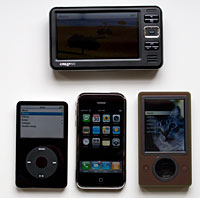
Top: Creative Zen Vision W. Bottom: iPod Video, iPhone and Zune.

Unlike the iPod, the iPhone does not support hard disk mode. This means you can't mount it like a portable hard drive and use it to transfer files between home and office, nor can you copy Office files or PDFs. But multimedia file transfer support via iTunes is excellent. It's easy to move photos to and from the iPhone and both tunes and video transfer as simply as they do with an iPod.

The iPhone comes with YouTube and this plays the approximately 10,000 videos that YouTube has converted to H.264 format. YouTube will continue to convert files to this format, so the selection will grow. Videos look better on the iPhone than they do in their Flash iteration on the desktop, and the player has a variety of options including bookmarking. YouTube is watchable over EDGE but it's really best for WiFi use.

Google Maps has been completely iPhone-ized to support finger scrolling, pinch-zooming and tapping. There isn't enough space here to describe all it can do: watch one of the demos on Apple's web site. There are map and satellite views, list view, POIs, directions, traffic and more. Satellite imagery looks great, and loads quickly even over EDGE. We quickly found our location on the map, saved it as a favorite then typed in "movie theater" plus our zip code to see a map with pinpoint markings of all the theaters in our area. Tap on it to see the address and double-tap to get more info about that theater including a web page with show times (if the theater has one).

Apple includes two Widgets: one that tracks stocks via Yahoo (you can add and remove stocks) and weather (you can have several cities tracked, and flip between them with a finger). These work quickly over EDGE. The clock is a world clock (again, you can track several cities), alarm clock, timer and stopwatch. There's also a basic calculator, a capable threaded SMS app that integrates with the address book and a photo viewer that can handle JPEG, GIF, BMP and TIFF files. The contacts application has every field one would ever need, including a caller ID photo and you can dial from the address book. You can set favorites (a speed dial list) and this is accessible from the phone screen, as is contact, call history, a voicemail shortcut and the keypad. The calendar has list, month and year views but no week view (odd). It supports repeating events, multi-day events and more. The Notes application is a text-based notepad and you can save and email notes but not sync them.

Two things take getting used to: application settings aren't accessible inside the application. You'll need to go to the Settings icon on the Home screen and scroll through the list of applications to get to their settings. The good part is complete standardization of the interface: you never have to wonder where an application has hidden that setting you were looking for. The drawback is you must leave the application to change its settings. The other odd thing is that there is no exit application function. Granted Windows Mobile doesn't have this either, but Windows Mobile devices have a habit of becoming unstable due to memory management issues as a result. Palm OS doesn't have this because Palm OS doesn't support multi-tasking. Nokia S60 apps do have both close (minimize in Windows Mobile lingo) and exit options. Given that most of the competition doesn't give you an exit option, what's the worry? So far none since the phone has been stable, even with every app launched repeatedly over several days. You can force quit a misbehaving application by pressing the sleep/power button for more than 6 seconds.

Camera

This is a bit strange, but there are absolutely no camera settings whatsoever. There's an on-screen shutter button and that's it. No resolution setting, no white balance and no color effects. The 2 megapixel takes 1600 x 1200 pixel images of excellent image quality given the tiny fixed focus lens. Colors are saturated and accurate, noise is kept to a minimum and shots are sharp with plenty of detail. There is no flash, no self-portrait mirror (that would mess with the iPhone's pretty design, we assume) and the camera cannot shoot video. Nor can the iPhone send or receive MMS. If you wish to send a photo, you'll have to use email.

Accessory Compatibility

Docks, cables and chargers with iPod 30 pin connectors worked fine in our tests. Speakers such as the Altec Lansing iM7, Xtreme Mac Luna and JBL On Stage II worked but the iPhone gave a warning that they weren't certified to work with iPhone and gave an option to turn on flight mode which you don't have to do. But speakers aren't always shielded against 850MHz cellular interference and you might hear some buzzing in the speakers. None of our speakers were able to control the volume however, nor did changing volume on the iPhone have any effect-- and that's a problem.

Battery Life

The iPhone has a Lithium Ion battery that's not user replaceable as we mentioned. Shame on you Apple. After 300 to 400 full charges, you'll have to send it to Apple for an $86 (including shipping) battery replacement that takes 3 business days. The only saving grace is the iPhone has phenomenal battery life, and unlike many Windows Mobile and even some S60 Nokia smartphones, it doesn't require daily charging with moderate to even heavy use. We don't know how Apple has done this: a large bright display, powerful CPU and lots of flash memory should eat lots of power. Even WiFi lasts way beyond the 2 to 3 hours we get with most PDA phones. And it plays video twice as long as my iPod Video 5G: just a bit above 6 hours in our tests so far. Music playback is close to the claimed 24 hours and an hour long phone call dropped the battery about 15% (Bluetooth and WiFi were on). We'll update this section with more information as our tests progress.

The iPhone has flight mode, so you can use it as a multimedia player on a plane, and you can turn Bluetooth and WiFi on/off to conserve battery power if needed. Though Bluetooth had no impact on battery life in our tests.

Bluetooth

Not many profiles here: handsfree and headset. No A2DP (that's not in regular Mac OS X Tiger either, *sigh*), no file transfer, no HID for Bluetooth keyboards. The iPhone doesn't beg for file transfer because it's so easy to get content onto the iPhone and camera photos off via iTunes syncing. But still, there's no way to Bluetooth a camera photo to your buddie's phone or PC or share an unprotected music or video file.

The iPhone has good but not top-notch voice quality when working with Bluetooth headsets. We tested the iPhone with the Jawbone Bluetooth headset, the Plantronics Explorer 330 and the Plantronics Discovery 655 Bluetooth headsets. Apple's own Bluetooth headset was not available at the iPhone launch, but we'll test and review it when it is available. The iPhone paired with all headsets with ease, and it can only pair with one headset at a time (it unpairs the last one before pairing with a new one). To pair the iPhone with a Bluetooth headset or a car kit, go to Settings/General/Bluetooth and turn Bluetooth on. The iPhone will start searching for Bluetooth devices automatically once you've turned on Bluetooth. After the iPhone pairs with a Bluetooth headset, it will add that headset as an audio source (along with speakerphone and iPhone).

The Plantronics Explorer 330 had the best voice quality on the incoming end while the Discovery 655 had the best outgoing voice quality with clear voice and no digital distortion. The voice via the Jawbone was good, but sounded a little muddy to our call recipients when the headset's noise cancelling was on. The volume isn't terribly loud compared to other phones via Bluetooth headset, but it's adequate for even noisy environments. The DSP and noise blocking technologies on these headsets worked fairly effectively when making calls on the iPhone. The range between the phone and the headsets wasn't the best we've seen either but not bad either. The Jawbone reached 10-15 feet before we started hearing some breakup; the Explorer 330 isn't the best in range and only reached 8-10 feet while the Discovery 655 reached about 10-12 feet.

In the Box

Apple includes the iPhone (of course), a 3.5mm stereo headset with built-in mic, dock, USB cable with 30 pin standard dock connector, a USB power adapter, cleaning cloth and printed documentation.

Conclusion

It is indeed revolutionary, super-sexy and insanely easy to use. This is a phone you could give your multimedia-lovin' mum and she'd get the hang of everything quickly. And she'd appreciate the large icons too . Steve Jobs wasn't exaggerating when he said this was the best iPod Apple has ever made. The fantastic wide screen display, responsive and beautiful cover flow, good audio quality and support for every file that a regular iPod should make this the darling of iPod fans. The phone works well in terms of volume, voice quality and reception. It's powerful enough to compete with smartphones but the lack of a physical keyboard and 3rd party applications (including an Office suite) mean it falls short for those with serious business needs. If you simply need excellent email, a superb web browser, RSS and attachment viewing, then it will suffice. This phone does so much so well (my word, the commercials weren't an exaggeration) and in such new and ingenious ways that it is hard to compare it to any other phone on the market. We love HTC, but it puts the HTC Touch to shame when it comes to touchiness and multimedia, and even the LG Prada can't come close to competing in terms of touch interface and functionality. The iPhone isn't perfect, but it's the most impressive first version of a new kind of device that we've seen so far. It's practical, it's really fun, it looks great and it's easy to use. No it won't replace the corporate BlackBerry, but then again, that's not the market Apple is targeting.

Pro: We have to say it: undeniable cool in owning one. Fantastically easy to use (and easy to see) interface, yet the iPhone still qualifies as a smartphone, with some caveats. Extremely fast and responsive. Display auto-rotates very quickly. Stable. Fantastic for music and video playback. Google Maps and YouTube are phenomenal additions. Extremely good battery life given the feature set and capabilities. WiFi 802.11b/g is a plus and the phone seamlessly switched between EDGE and WiFi in our tests.

Con: No user replaceable battery. Repair requires sending it off to Apple for a claimed 3 business day repair time. No MMS, no 3G. Limited Bluetooth profiles-- what about those who want to use a Stereo Bluetooth headset, Bluetooth GPS or keyboard? No Office-compatible suite and not much in the way of 3rd party programs yet.

Price: $499 for the 4 gig model and $599 for the 8 gig

Sunday, July 22, 2007

When Mobile Phones Aren’t Truly Mobile

WIRELESS carriers in the United States are spiritual descendants of dear Ma Bell: they view total control over customers as their inherited birthright.

The younger generation — Verizon Wireless, Sprint Nextel, T-Mobile and the namesake child AT&T — would make their hallowed matriarch proud. They do everything they can to keep power firmly in their own hands. It is entirely at the carriers’ discretion to permit, or disable, the features that a factory loads into the newest phones. They also decide which software can be installed and how it may be used. Many wireless subscribers have ruefully become acquainted with gotcha clauses in their contracts.

In most European and Asian countries, a customer can switch carriers in a few seconds by removing a smart card from a cellphone and inserting a different one from a new provider. In the United States, wireless carriers have deliberately hobbled their phones to make flight to a competitor difficult, if not impossible.

Lars Klove for The New York Times

If you, the long-suffering subscriber, decide that you have had enough and wish to try your luck with another company, you’re free to pay your early-termination fee and go. But you most likely will have to abandon the phone you’ve already paid for, even when the technology is shared by the two carriers. (Sprint, for example, whose network is based on the CDMA standard, forbids the use of CDMA-based cellphones obtained from Verizon.) The odds are better than even that your cellphone is either locked by your incumbent carrier or forbidden for use on the network by your new one.

In the days when cellphones were inexpensive and could perform only one or two functions, they could be treated as disposable. When smart phones like the Palm Treo arrived, however, the cellphones became too pricey to abandon lightly when switching companies. Now the iPhone is here — if you’re willing to pony up $500 or $600. AT&T has received an exclusive contract from Apple, so iPhone buyers have no alternative carrier. But the lack of choices rankles and is drawing more scrutiny than ever.

Two weeks ago, Representative Edward J. Markey, Democrat of Massachusetts, led a House hearing on “wireless innovation and consumer protection” and held up an iPhone as Exhibit A in his assessment that the industry exerted “far too much control over the features, functions and applications that wireless gadget makers and content entrepreneurs can offer directly to consumers.” Why is it, he asked, that AT&T imposes a two-year contract with a $175 early-termination fee “even though the phone cost wasn’t subsidized and a consumer can’t even take it to use with another network provider?”

Wireless customers may soon have a few more options. In a coming auction for wireless spectrum that will be available in 2009, the Federal Communications Commission is preparing to set aside a third of the new capacity for bidders who agree to operate wireless services in a more open fashion.

Kevin J. Martin, the F.C.C. chairman, said in an interview last week that he had circulated a draft proposal among his fellow commissioners that would require the winning bidders to be receptive “to all kinds of devices and applications” provided by independent consumer electronics makers and third-party software providers.

Subscribers of the new services would even be permitted to take their phones with them, freely, from one carrier to another. Imagine: a genuinely mobile phone.

The pressure to provide consumers with more cellphone and software choices has been building for some time. In January, the F.C.C. took another step to loosen the exclusive grip of the cable operators’ control over the set-top box that feeds the cable signal to the TV, a move that showed that the commission is open to changes that give consumers more equipment choices.

Then, in February, Timothy Wu, a law professor at Columbia University, published an influential paper, “Wireless Net Neutrality,” which made a well-supported case that the government should compel wireless carriers to open their networks to equipment and software applications that the carriers did not control. Mr. Wu called his proposition a call for “Cellular Carterfone,” referring to the 1968 Carterfone ruling by the F.C.C. The Carterfone was a speakerphone-like gadget that permitted a phone sitting in a cradle to be connected with a two-way radio. Over the objections of AT&T, the F.C.C. ruled that consumers could plug it or any phone or accessory into the network so long as doing so did no harm to the network. The ruling set in motion the changes that provided consumers with a cornucopia of equipment choices like answering machines, fax machines, modems and cordless phones. Among Mr. Wu’s readers was Mr. Martin of the F.C.C.

The wireless carriers are fighting a cellular version of the Carterfone decision. They contend that they must exert control over all equipment used on their networks in order to protect the networks’ operations. AT&T says in an F.C.C. filing that only the carrier has the incentive to oversee “the integrity, security and efficient and economical use” of the network.

MR. WU’S paper, however, shows that the landline telephone industry used identical arguments, predicting dire consequences were its customers permitted to use equipment from unknown sources. In 1955, when AT&T was fighting to exclude a gadget called the Hush-A-Phone, the company solemnly argued, “It would be extremely difficult to furnish ‘good’ telephone service if telephone users were free to attach to the equipment, or use with it, all of the numerous kinds of foreign attachments, which are marketed by persons who have no responsibility for the quality of telephone service.”

As a postscript to the landline industry’s resistance to opening its networks, Mr. Wu said in an interview last week, “Things turned out not just O.K., but great.”

Companies like Google and Skype have called on the F.C.C. to open up more equipment and software options in the wireless industry. Google said on Friday that it would participate in the spectrum auction, committing a minimum of $4.6 billion, if the F.C.C. put into effect its "open access" proposals submitted earlier. Verizon Wireless, however, contended that Google’s proposals would open its network to phones that Verizon had not approved and “that cannot reliably communicate with law enforcement,” a grave problem “in an era of heightened national security concerns.”

In other words, stick with Verizon-certified phones, or the terrorists win.

The wireless industry is being dragged, ever so slowly and gently, into a scary new age — one that began in 1968 with Carterfone — that will require adjustment to reduced control. The industry can never credibly contend that its business practices foster competition and innovation as long as its customers are prevented from moving easily from one carrier to another. Last week, Representative Markey said: “How crazy is this? You can take your number with you, but you can’t take your new $500 phone with you.”

Thursday, July 19, 2007

Motorola L9 fails to bring in more punch


Once upon a time there used to be simple mobile phones. Later, companies started bundling several features along with the phones. These features were luring consumers who wanted more in their mobile phone, though these were mostly below average. In the third generation phones, calling and texting is a given. Mobile phones these days are sold more on their browsing, mailing capabilities and several add-ons like camera and MP3. Very soon mobile phones will enter the fourth generation — phones that include sensory and biometric plays which are already being tested.

But even in this ‘launched today, obsolete tomorrow’ world, there are some mobile phones that continue to come out with products that appear to be somewhere lost midway between the second and third generation. The Quad band Motorola SLVR L9 is one such phone. Motorola, once a leader in wireless communication, is still ahead of other players who are trying to garner some share of the mobile pie.

But, it seems to have lost out in the race to the Nokias and Sony Ericssons of the world. One hit product and then the noise settles down. It fails to lift the momentum. A brief chat with Motorola officials makes me conclude that very soon they will be taking competition head on.

Motorola phones are fashionable (remember Moto RAZR), but they fail to pack a punch. The new Motorola SLVR L9, is a stylish, smart, slim and sturdy candy phone, but this phone too falls on the punch meter. In fact, the phone is just an upgrade of the L7 with a couple of additional features including FM.

The 4-way navigation pad at the centre of the phone is perhaps the best navigation tool across phone manufacturers. The small circular rings within the pad gives a good grip to your thumb. Apart from the looks and the navigation pad, there is nothing much to talk about in the phone. The 2MP camera, FM, multimedia, call reception, battery life, browsing are just about average. Call clarity is high, but reception is poor. You get used to the new messaging system, though the smart text tries to read your mind and display the word you want to type, which gets annoying. Battery life has improved over the previous model, but is average.

It lasts about three hours on FM. Stereo headsets are designed stylishly but performance is average. One of the biggest issues in the Java enabled L9 is the slow response speed. That’s one of the reasons why the consumers thrashed the Nokia N95.

The retail kit has an MRP of Rs 10,800 (inclusive of all taxes) and bundles 128MB micro SD card, USB data cable and a stereo headset along with the standard stuff. The retail kit with a bluetooth headset is priced a little more. The phone however, sells at a little over Rs 8,000 at some of the big outlets in Mumbai. The L9, with a 256K TFT colour screen, does a one up on some brands with its metal body. Wear and tear of the plastic bodies is fast compared to metal bodies. However, plastic buttons coated with chrome play a spoilsport. The chrome wears out fast and you see dirty white plastic spots. This occurs in just two weeks of review. Maybe Motorola is looking into this.

The other issue is performance. The average performance is due to the fact that the phone can’t multi task. And often some of the functions fail to work to their potential. One brand new retail set sent to us suddenly went dead and would refuse to start again. Motorola representative refused to tell us why. Was it one of the retail packs that sneaked through the six sigma system? But, when it was repaired and sent back to us, it worked okay.

The reason why we mentioned this is the lack of many service centres. So, if you happen to be one of the unlucky customers you would probably have to run around a lot because the dealers just refuse to change it. Overall, a phone that tries to pack in a lot but quality suffers. So, at best the phone is average. Our value for money and satisfaction meter points the L9 at 50%.